codeanywhere-docs
Workspace set-up: GitHub repository
Setting up a GitHub repository.
Setting up a GitHub repository
-
Log in on GitHub
-
Navigate to the CI Full Template repository
-
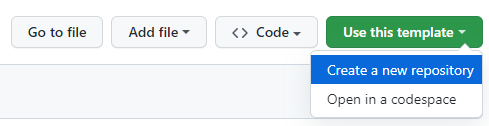
Click the Use this template button and select Create a new repository
-
Give your repository a relevant name
Reminder: Github repository names do not allow spaces. Please use dashes instead where necessary, e.g. my-brilliant-project
-
Click Create repository from template

-
Once your repository has been created on GitHub, copy the repository URL

Up Next
Well done, your repository is now set up! Go to the next page for the steps on how to set up your workspace.